Problem: Whenever I try to run an executable file with a command such as ./file or just double-clicking nothing happens and I get this returned in the terminal.
- cannot execute binary file: Exec format error
What I am trying to achieve: I am now just trying to install the latest version of eclipse (4.7 AKA Oxygen) using the executable file (not .exe and is 32-bit called "eclipse-inst") on a 32-bit OS (Ubuntu MATE 16.04) using a 32-bit processor. Of course, it returns with the text above.
What I am using to run Linux:
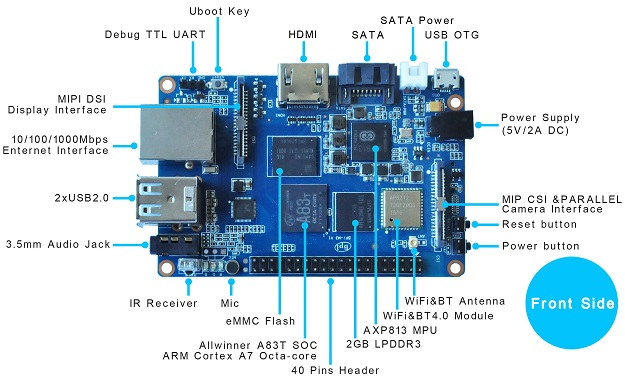
A Banana Pi M3 (Specific specs at: https://www.cnx-software.com/wp-content/uploads/2015/07/Banana_PI_BPI-M3.jpg)
A7 ARM Processor
2GB of RAM
Ubuntu MATE 16.04 (32-bit)
Things to note:
Installer is made for 32-bit Linux which I'm using
Again, I'm using ARM
The file I'm trying to install is in /home/user/Downloads. Please let me know if there is a specific place I need to install from. That would be very helpful.


cat /etc/fstaband post it. Now when you domountyou will see all mounted files and from there you will see if any has thenoexecattribute which will prevent running scripts on that mounted file. – George Udosen Aug 27 '17 at 05:46mount | grep noexecand post into your question – George Udosen Aug 27 '17 at 05:49wine). – sudodus Aug 27 '17 at 06:35a swapfile is not a swap partition, no line here
use dphys-swapfile swap[on|off] for that
– Anoraki Aug 27 '17 at 16:19proc /proc ...into it. Also, please render it as code by indenting each line with 4 spaces. It makes it easier to read. – sudodus Aug 27 '17 at 16:48./program(use a real example)? Please show the output of the following command,ls -l ./programand for examplels -l /bin/echo(with the standard programecho). – sudodus Aug 27 '17 at 20:38file ./program; ldd ./program; uname -ato the post, please. – muru Aug 28 '17 at 01:14