0

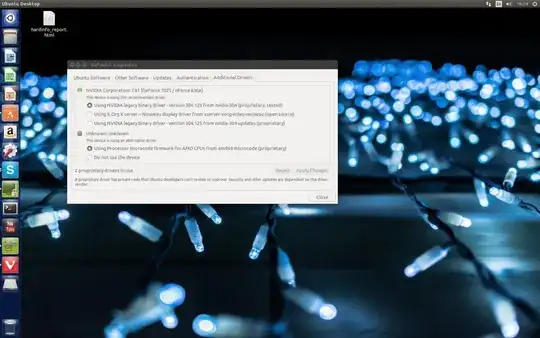
This is first time im installing ubuntu, after i installed it and updated my pc crashed few times (display just suddenly freez and show a lot artifacts). I found that my openGL renderer was unknown After i changed driver, openGL renderer now identified correctly Pc dont crash anymore, but still all animations shutter hard and overall video performance is slow.
I have no idea how to solve this, but it feels like video dont have enough video memory.

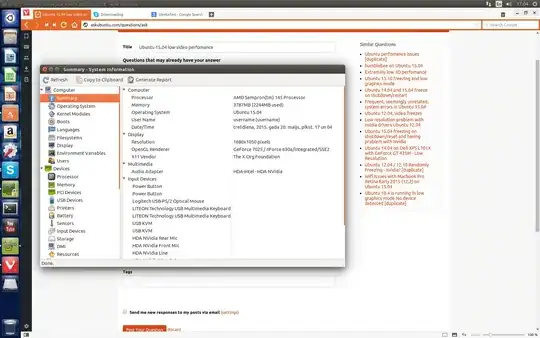
There is my pc specs. Im running on ssd 120gb kingston 90gb windows7 32bit / 30gb ubuntu 15.04 64bit -Computer-

Motherboard: Gigabyte GA-M68MT-D3

Processor : AMD Sempron(tm) 145 Processor

Memory : 3787MB (2137MB used)

Operating System : Ubuntu 15.04

-Display- Resolution : 1680x1050 pixels

OpenGL Renderer : GeForce 7025 / nForce 630a/integrated/SSE2

X11 Vendor : The X.Org Foundation

-SCSI Disks- TSSTcorp CDW/DVD SH-M522C ATA KINGSTON SV300S3

Please help


username@username-M68MT-D3:~$ lspci -k | egrep 'VGA|3D|Display' -A2

00:0d.0 VGA compatible controller: NVIDIA Corporation C61 [GeForce 7025 / nForce 630a] (rev a2)
    Subsystem: Gigabyte Technology Co., Ltd Device d000
    Kernel driver in use: nvidia
JoKeR
  • 6,972
  • 9
  • 43
  • 65
yoba
  • 3

2 Answers2

0

This integrated video adapter GeForce 7025 / nForce 630a never worked well with proprietary nvidia-304 drivers. It works quite well with nvidia-173, but it is not supported in Ubuntu 15.04, as far as I know. I would suggest one of these solutions.

  1. Try open source driver. It should work quite well for this chip.
  2. Install Ubuntu 14.04 LTS with nvidia-173 driver.
Pilot6
  • 90,100
  • 91
  • 213
  • 324
  • First solution helped, now everything works smoothly, thank you! – yoba May 20 '15 at 14:46
  • ah, but old problem came back, now its crashing after few minutes, i think ill just try 14.04 – yoba May 20 '15 at 14:57
  • It is a good idea to try, but crashing may be a hardware problem. – Pilot6 May 20 '15 at 15:36
  • Today i have installed 14.04 but now its crashing on login screen every time with exact same visual artifacts http://puu.sh/hV3jr/88ba2abc5e.jpg – yoba May 21 '15 at 07:49
  • Did you install nvidia-173? – Pilot6 May 21 '15 at 07:50
  • No. Im crashing on login, is there a way to install them? – yoba May 21 '15 at 07:52
  • Press Ctrl+Alt+F1, login to console and run "sudo apt-get install nvidia-173". But I am afraid this is a hardware problem. – Pilot6 May 21 '15 at 07:55
  • No, i just dont have time to do that, freezing right after it load into login screen, do linux and windows use hardware differently? I never had problems on windows 7 – yoba May 21 '15 at 08:06
  • Then you can boot to recovery console, using grub, then choose "root" and then run "mount -o remount,rw /" and "sudo apt-get install nvidia-173". – Pilot6 May 21 '15 at 08:08
  • I tried to reinstall but without automatic updates, nothing changed, then i tried to install driver in recovery console and got error, then i run in low-resolution mode and tried to install nvidia-173 from terminal and got same error as in recovery http://oi60.tinypic.com/28hec09.jpg – yoba May 21 '15 at 08:50
  • This is because you install Ubuntu 14.04.2 with new xorg. The easiest way is to find original 14.04 iso and install it. It can be done without this, but it is to complex to explain in comments. – Pilot6 May 21 '15 at 08:54
  • Installed 14.04 and installed nvidia-173 from recovery, now everything runs ok in login screen, there is no lag at all, but after i log in my desktop freezes, everything seems to work but video not responding (better explanation https://yadi.sk/i/NBsee6Esgn6r3) – yoba May 21 '15 at 09:55
  • Tried some solutions for this problem (http://askubuntu.com/questions/565067/fresh-install-of-ubuntu-14-04-1-lts-freezes-after-login http://askubuntu.com/questions/449479/ubuntu-14-04-lts-crashes-after-login) none of them helped, and now i cant even start new installation, artifact all over the screen even in installation, i think its hardware problem, so ill just try to install on different motherboard. – yoba May 21 '15 at 12:52
0

It seems that ubuntu is heavy for your system. I would suggest use another ubuntu flavor. Try out Xubuntu 16.04. it's less resource hungry :D