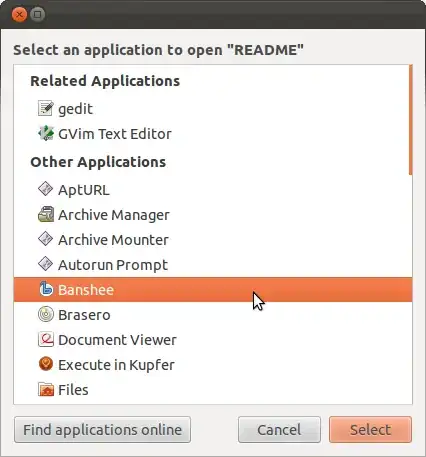
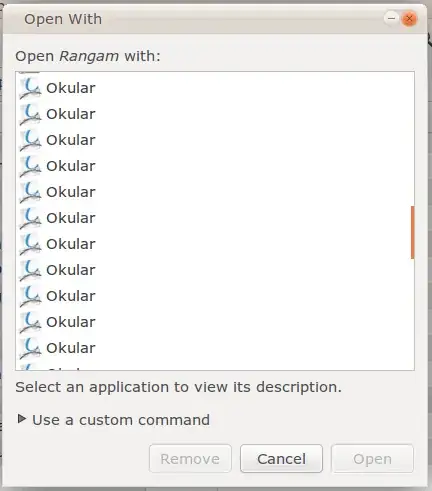
(For the solution, skip to the bottom. I'll explain some technical details in case it's useful to someone trying to understand why it happens.)
The problem is that there are multiple .desktop files for that program with different filenames in applications directories.
In Ubuntu, applications directories are:
~/.local/share/applications
/usr/share/applications
For example, on my system, there are three entries for Banshee in /usr/share/applications/:
/usr/share/applications/banshee.desktop
/usr/share/applications/banshee-audiocd.desktop
/usr/share/applications/banshee-media-player.desktop
which results in three entries for Banshee in the Open With Other Application... dialog.

One solution is deleting the extra .desktop files, but that could break opening other file types (for example, banshee-audiocd.desktop is used to open audio CDs).
The right solution is adding a Hidden=true line to these duplicate .desktop files in /usr/share/applications/. However, I don't recommend you do it because it requires messing with system files owned by root (this fix should be there by default).
So, what can you do until this is fixed in Ubuntu?
Solution
Remember I said with different filenames in the beginning? That's because .desktop files in ~/.local have higher priority over system-wide .desktop files with the same name. So, copy the entries you want to get rid of from /usr/share/applications to ~/.local/share/applications and add Hidden=true to them.
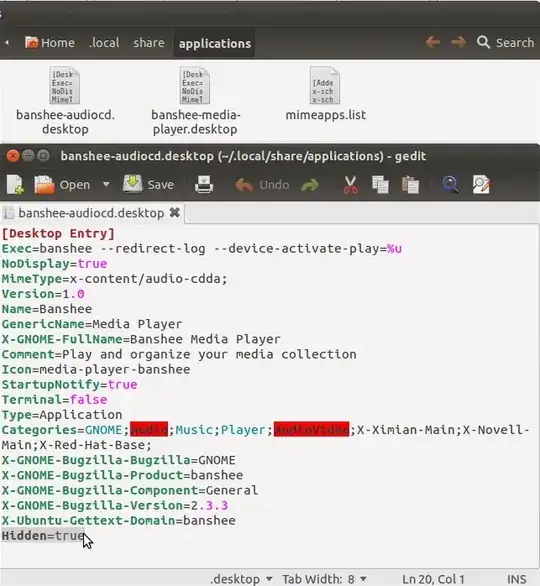
Problem solved!