3

Can anyone help me, I cant log-in to my laptop. Looks like its just looping back to the login screen.

what may have caused it, I was working on an AWS EC2 lab and after setting up an instance i downloaded the PEM/PPK saved it in a folder. Then I had to open the terminal and and type chmod 600 ~/ <pathToPem> see Image below, I got an error so I put sudo chmod 600 ~/ pathname. (nearly sure this is why I'm getting my problem) when I ran the second command It couldn't find the path and when I checked my files/folder in home a lot had disappeared? so at that stag I logged out and tried to log back in and just seem to be stuck in a loop.

Can anyone help me get back in and undo what I have done. I can get the text log in and get in that way but don't seem to have permissions to do anything.

tried to run ls -la .Xauthority and get ls: cannot access .Xauthority: No such file or directory.
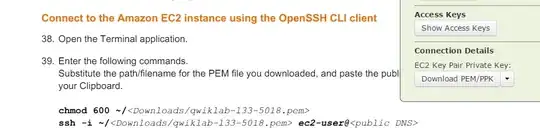
enter image description here

Gman
  • 481
  • No I downloaded the file to a folder called Amazon. and ran the command 'chmod 600 ~/ /Amazon/qwiklab-133-5018.pem'. When I press 'Ctrl + Alt + F4' I can log in but don't have any permissions. and If i run 'sudo su' and put my password in I can go into my documents folder and they are all there. Did I do something with my permissions? and if so How do I change them back. – Gman Feb 15 '15 at 02:46
  • Yes that what I was thinking, but because i'm new to ubuntu I didn't want to take another chance. Got it working again. chmod 755 ~/ and then ls -l /home/yourusername. Thanks very much for your help @Serg really appreciate it. Can you put it as the answer so I can mark as answered and it might help someone else. – Gman Feb 15 '15 at 03:36
  • Yup, I'll post it in a minute. Let's just clean up the comment section. Add the original code you ran to your question, and whatever other relevant info you posted in the comments – Sergiy Kolodyazhnyy Feb 15 '15 at 03:51

1 Answers1

3

Solution

You have altered permissions to your home folder. To change the permissions back, login into the text console ,Ctrl+Alt+F2 (or any other F key from 1 to 6 ), then loginn as root with sudo su and do chmod 755 ~/

Explanation

In the original command that you ran there is space between ~/ and /Amazon/qwiklab-133-5018.pem. Shell treats them at two separate arguments to chmod command. You have effectively changed permissions on your home folder to 600, which is read/write permissions to only yourself. You can confirm the permissions to your home folder by loging in with sudo su and doing ls -l /home/yourusername. Replace yourusername with your actual user name. you should see line like this -rw------- there.

The reason why you couldn't log in graphically, is because the graphical log-in screen, the greeter, would need to read configs in your home folder, to set up the graphical environment. Ctrl+Alt+F4 , which is just text interface environment, doesn't need such configs. That's why you are able to login there.

Sergiy Kolodyazhnyy
  • 105,154
  • 20
  • 279
  • 497