I want to run a command foo on one terminal and pass the result to another terminal. Is it possible to do this ?
Asked
Active
Viewed 2.2k times
36

-
4Also look into tmux and screen, both of which allow you to take over, mirror, or just execute commands on, other sessions. – Kevin Jul 12 '14 at 18:32
2 Answers
46
Yes, it is. A picture worth a thousand words:
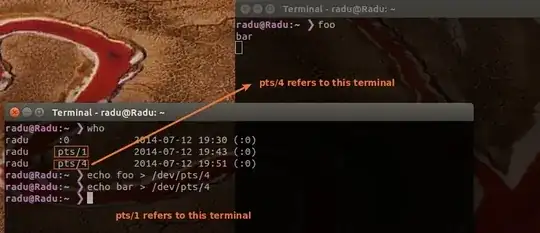
So, you have to redirect the output of your command using > operator to /dev/pts/#. You can find # using who or w command. If tou want to redirect and the errors, use:
<command> >& /dev/pts/#

Radu Rădeanu
- 169,590
-
thanks. but if the another terminal does not exist. what we should do? Or better to say pass it to newer one? – Mohammad Reza Rezwani Jul 12 '14 at 17:07
-
5You will need probably a script to do that: the script will take as argument your command then should open a new
gnome-terminaland detect the tty (usingttycommand) of the new terminal and finally send the output to it. – Radu Rădeanu Jul 12 '14 at 17:25
8
Something like this for your $HOME/.bashrc :
ng() { gnome-terminal -x sh -c "$*; bash"; }
This will run a command and shows the result on a new terminal window.
Examples:
ng ls -l
ng echo foo
Edit: To consider aliases from the $HOME/.bashrc use this instead:
ng() { gnome-terminal -x bash -ic "$*; bash"; }
then the output of ls should be colored (thanks to Radu Rădeanu for this hint).


-
-
-
-
Ok there is a advantage with your method the output of
lsis colored, don't know why this is not the case with my function... – TuKsn Jul 12 '14 at 17:57 -
4You will understand if you will run
type lsand thenng type ls:) – Radu Rădeanu Jul 12 '14 at 18:01 -
1if write function in one line in bashrc, maybe need a semicolon to end it, or you will meet an "unexpected end of file" error. so
ng() { gnome-terminal -x sh -c "$*; bash" ;}should be better. And if you are using xfce(xfce4-terminal as default emulator):ng() { xfce4-terminal -x sh -c "$*; bash" ;}or you can simply run by any default emulatorng() { x-terminal-emulator -x sh -c "$*; bash";}– Jul 16 '14 at 01:28 -
@highwind thank you for the hint, I've changed it. But
x-terminal-emulatordidn't work for me. – TuKsn Jul 16 '14 at 07:25