I would like to have my screen fully powered at all times, but it goes to standby once I lock my PC.
Asked
Active
Viewed 4.9k times

2 Answers
15
Open your System Settings. We need to make changes to Power and Brightness & Lock settings.

Power Settings
Change the value of Suspend when inactive for to Don't suspend.

Brightness & Lock Settings
Change the value of Turn screen off when inactive for to Never.
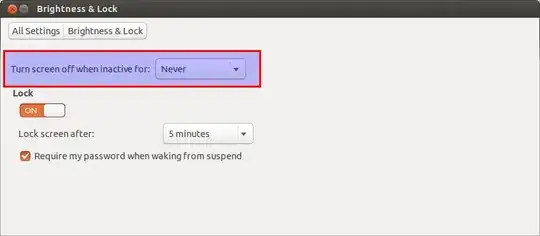
This should help to achieve your desired result.


-
2Thanks. For my particular issue (my speakers which were powered by the monitor would turn off when the screen gets locked) I just had to disable a setting of the display itself. Still, this answers the question I asked. – Andreas Hartmann Sep 25 '13 at 13:02
3
I had to install additional screensaver program XScreenSaver and use it instead of default one because accepted answer had no effect for me on Ubuntu 16.04 and 17.10.
Install XScreenSaver:
sudo apt install xscreensaverAdd this command to Startup Applications:
xscreensaver -nosplashDisable default Super+L shortcut
Install CompizConfig Settings Manager
sudo apt install compizconfig-settings-managerLaunch it and click "Ubuntu Unity Plugin"
Click the button next to "Key to lock the screen."
Disable
Add this command to enable Super+L shortcut for XScreenSaver in System Settings → Keyboard → Shortcuts → Custom Shortcuts:
xscreensaver-command -lock


-
How can I add
Super(=Windows button/CMD) +Las a custom shortcut if pressing that makes me logout directly :) when I want to set the shortcut? /// found out myself. Go to Settings --> Keyboard Shortcuts --> roughly in the middle, you find the topicSystem, at the 3rd line, there isLog outwithSuper+LShortcut. Click on it and give it something you do not need likeSuper+;. Then go down toCustom Shortcutsand addSuper+Lfor the custom logout command. – questionto42 Feb 03 '22 at 09:12