I have a dual boot system with Ubuntu 12.04 and Windows 7, using GRUB2 (with Burg) as boot loader.
For some reason, the Windows installation shows up twice in the boot menu:
Ubuntu GNU/Linux, with Linux 3.2.0-24-generic
Ubuntu GNU/Linux, with Linux 3.2.0-24-generic (recovery mode)
Windows 7 (loader) (on /dev/sda1)
Windows 7 (loader) (on /dev/sda2)
If I look in my partition table, /dev/sda2 is C:\ of the Windows installation, and /dev/sda1 is the "System Reserved" partition (which, IIRC, is Windows' own bootloader). Furthermore, gparted shows /dev/sda2 - but no other partitions - with a boot flag:
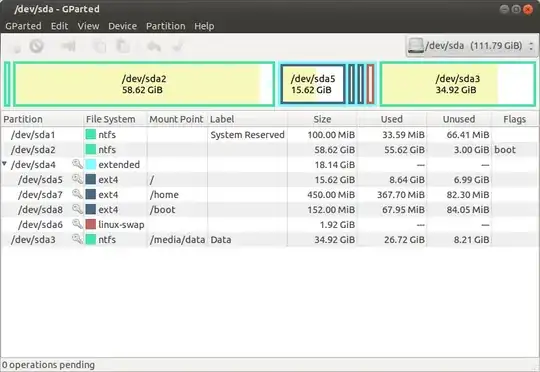
What is going on here? I'd like to have only the entries for Ubuntu and one entry for Windows in my boot menu - how do I remove one of them?


bootmgrand the BCD store (call it bootmgr.cfg); bootmgr presents the selection menu, etc. but if you select Windows, it will chainload it from the root partition. The MBR code per se just loadsbootmgrinto memory. See this bcdedit pastebin. I temporarily assignedQ:to the reserved partition; the "Windows Boot Loader" section contains the parameters tellingbootmgrhow to chainload. If you assign a drive letter, you'll see thatdir /ah Q:containsbootmgrand theBootdir, butdir /ah C:doesnt. – ish Jun 03 '12 at 05:47C:. BTW, when the drive assignmentQ:is removed, it reverts topartition=\Device\HarddiskVolume1– ish Jun 03 '12 at 05:49