1

I have I issue with my ubuntu (v.19.something) install. I attempted to permanently activate numpad by executing a script I found on in a thread on this page (picture of script below):
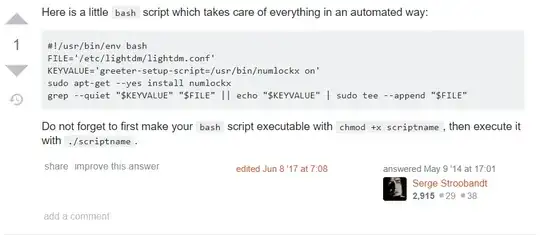
How to enable numlock at boot time for login screen?

I executed the script as instructed. All seemed fine until I logged off. However, I am now unable to log in with the boot caught in a loop. This is what is displayed:

loop: Failed to start Light Display Manager.

I tried to find a solution by using google, unfortunately pressing "ctrl + F1", "ctrl + alt + F1/F2", etc when in the mode in the above shown picture does not grant me access to the terminal.

I have no idea how to fix this and I would immensely appreciate help! I am fairly new to Linux by the way so bare with me.

Morten
  • 21
  • Which version of ubuntu are you running? Have you tried reverting the changes you've made to your system? – BulletBob Mar 23 '20 at 13:37
  • Thanks for your reply. I updated to the newest available version during this weekend. It was 19.something, but I cannot recall the exact number. How do I revert the changes? I am quite new to Linux so even this may be trivial to many it is not to me. – Morten Mar 23 '20 at 13:42
  • which skript did you exactly use from https://askubuntu.com/questions/155679/how-to-enable-numlock-at-boot-time-for-login-screen?fbclid=IwAR1mv4PW_hV508qlxuNcpqork-RWM5DCPEKZjntmlOwA6KEfMr4ufXMjNGk – nobody Mar 23 '20 at 13:48
  • If you click the link in my post there is a screen shot of it. In the thread it is the post by "Serge Stroobandt" at the end of the page. – Morten Mar 23 '20 at 13:55
  • I can confirm this behaviour is repeatable. It appears this is an over sight with the ubuntu boot process where if you have a failing service that has a no limit timeout then you are screwed. Ctrl-Alt-F* won't save you as the login service has not yet started. Unless you have another system to make the necessary changes you will need to reinstall and don;t forget to install lightdm greeter as well next time!!! – WallyZ Jun 12 '23 at 09:02

0 Answers0